See What’s New in the February 2026 Release
Key Takeaways
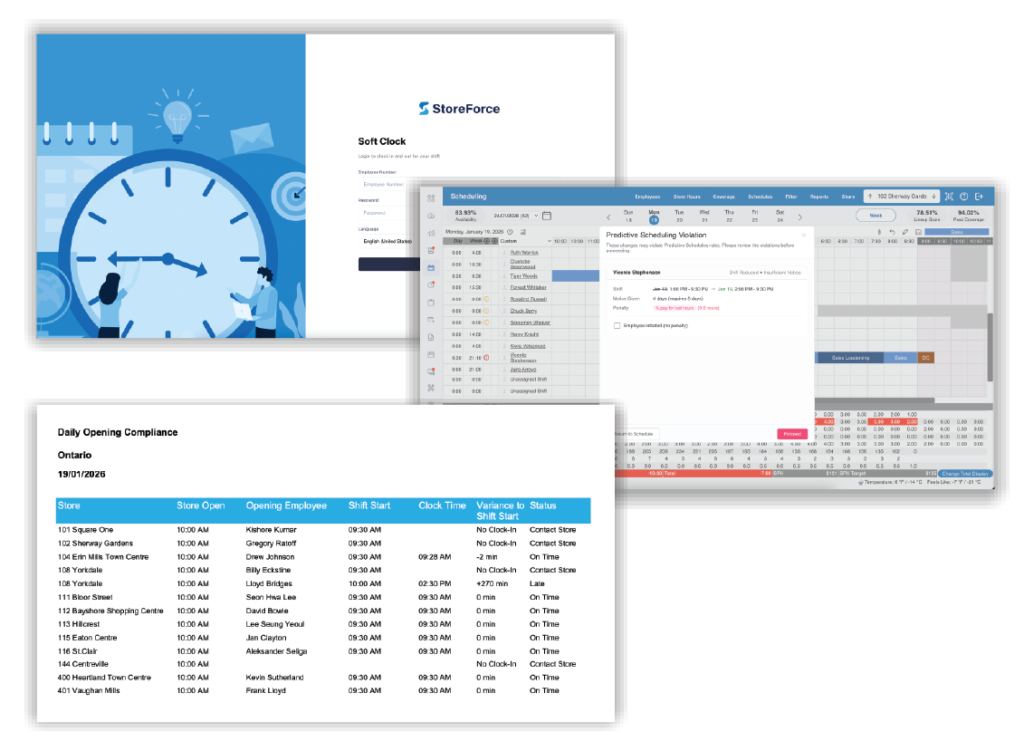
– A redesigned Soft Clock makes clocking in and out clearer and faster for store teams.
– Timecard Attestation captures shiftend accuracy before issues hit payroll.
– Predictive Scheduling now includes citylevel rule configuration, realtime alerts, and clearer reporting.
– The Daily Opening Compliance Report shows which stores opened on time each morning.
– A new Store Attribute prompt helps prevent setup gaps when adding new locations.
Episode #1
Release Overview
Get a quick highlevel look at the key features in this release and how they work together to streamline operations across your organization.
Episode #2
A Clearer Soft Clock Experience
Employees can now see their shift, breaks, and clock history at a glance. This update makes clocking faster, reduces endofshift mistakes, and gives teams a more intuitive experience at shared terminals.
Episode #3
Timecard Attestation Made Easy
Employees can confirm their time or report an issue before they clock out. This small step supports compliance, reduces backandforth, and ensures payroll teams get cleaner timecards.
Episode #4
Predictive Scheduling: Smarter Rule Setup
Set predictive scheduling rules at the jurisdiction level. Define notice windows, specify which changes matter, and help ensure consistency across locations.
Episode #5
Predictive Scheduling: RealTime Alerts
StoreForce flags potential penalties the moment a schedule change is made. Managers see exactly what the change impacts and whether it was employeeinitiated.
Episode #6
Predictive Scheduling: Clear Reporting and KPIs
Enhanced reporting shows which changes created penalties and why. A new KPI in Time and Attendance helps leaders track trends and take early action where needed.
Episode #7
Daily Opening Compliance Overview
Start each morning with confidence. This report shows which stores opened on time and which locations need followup, giving leaders immediate clarity.
Episode #8
Faster Store Setup with Guided Attributes
New stores now appear in the hierarchy right away, and teams receive a prompt to complete store attributes. This prevents setup gaps and improves data accuracy.
Episode #9
Release Wrap Up
Thanks for watching the series. If you’d like to learn more or apply these features to your own environment, connect with your Client Success Manager.
You can also download the full February Release Notes below.